
Your Uninstaller! is an excellent choice for anyone looking for a comprehensive uninstallation solution. The program is easy to use and provides a thorough removal of all registry entries and corresponding folder structures associated with a given program. It also removes any remaining artifacts that usually remain after a standard Windows uninstall. The program is fast and efficient, and the user interface is intuitive and user-friendly. Overall, Your Uninstaller! is an excellent choice for anyone looking for a comprehensive and reliable uninstallation solution.
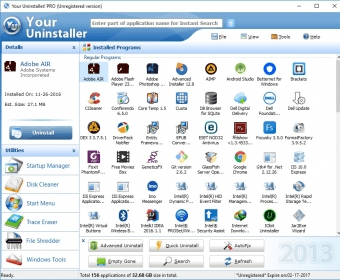
Although Windows comes with a quite decent uninstaller tool, it has the disadvantage of leaving a lot of junk data behind after removing a program. Fortunately for us, there are other third-party applications that can do a much cleaner job, such as Your Uninstaller! This application comes with a set of other useful features and tools. With a tabbed interface that allows finding the desired feature with no difficulty, this program is easy to use by anyone. Moreover, every button or option has appropriate help captions.
As said, the main use of this tool is to uninstall programs that are no longer needed. In this regard, on Quick Uninstall mode, this is done with practically no intervention by the user. Advanced Uninstall, in turn, can clear all data about a damaged program than cannot be removed using its built-in uninstaller. Finally, there is Hunter mode, an extremely easy way to uninstall programs by a simple drag-and-drop procedure. In all cases, the application can create a restore point to preserve your system from undesirable side effects. Unluckily, I could not find a way to remove applications in batches.
Your Uninstaller! can also perform other functions. One of them is fixing an invalid installation. In addition, it can also help you manage startup entries to reduce your system’s boot time. Last but not least, there is a series of tools intended to preserve your privacy. For example, the Internet Trace Eraser, which deletes surfing evidences like visited URLs, downloads and autocomplete contents. File Shredder is another similar tool, which can wipe data from your hard disks beyond recovery.
In a nutshell, Your Uninstaller! does exactly what its name suggests and a little more. It is very effective in removing installed programs without leaving any traces. It really deserves a try so it is good that its trial version can be used for 21 days without limitations.






Comments (17)